Making it yours
Try another look for a part
Not keen on how a part looks? Step through its other designs — the ones that suit your trade — with one button. Your words stay as they are.
- 1
Choose the part
Tap the part of your page you want to change. A bar appears at its corner.
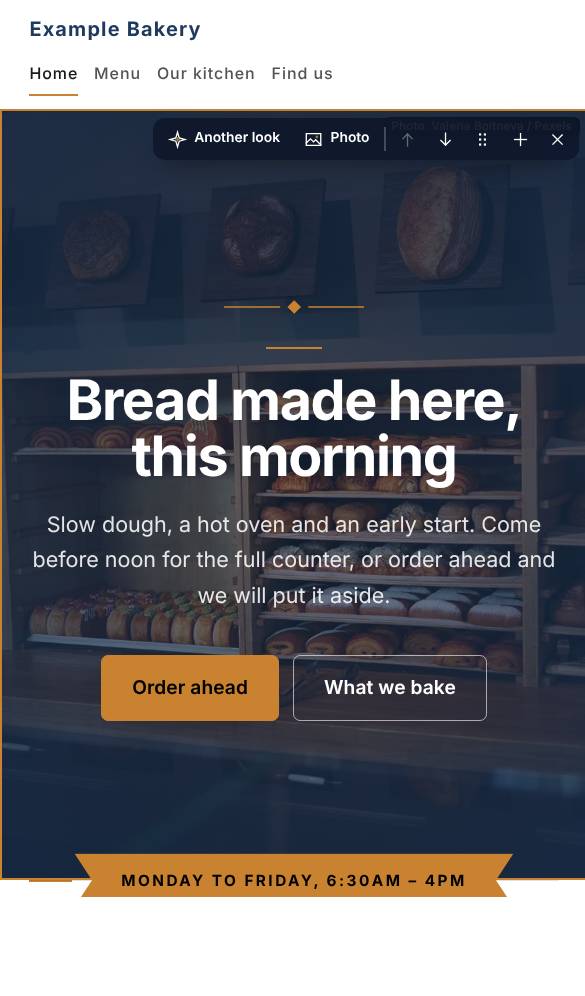
- 2
Press Another look
The part is drawn its next way — cards, a price list, a drop-down list, the photo on the other side — and the page shows it at once. Keep pressing to see each one, up to nine; the arrows in the editor go back.
- 3
Shuffle the page
Not sure about the order? Press Shuffle above the page. The parts in the middle change places; the opening stays first and the close stays last. Put it back returns the order you had.
- 4
Every setting, in Expert mode
At the foot of a part's editor, switch on Expert mode for the rest: where the photo goes, its edge, a film, a 3D model, the list behind it. It stays on until you switch it off.
Questions about this
Where do the photos come from?
Your site starts with photos chosen for your kind of business, free to use. Replace any of them with your own — your own photos always look best. Press Photo on a part to upload one, or to choose from yours and our free ones.
Can I change the look later?
Any time before you buy, and your words and photos come with you. After buying, reopen the site for editing and change anything: the first three reopenings are free.
Can I have my site in two languages?
Yes. Any language can be translated automatically in the builder with writing credits (8 a language). The translation is done by machine, not checked by a person, so read it over — or have someone who speaks the language read it — before you publish.